
Do you know how to Add Email Contact Form in Blogspot (Blogger)? It’s really an important thing to have a contact page in your blog. So you can easily receive suggestions, inquiries and complaints from your visitors.
Best Blogging Tools 2026
Starting a blog? The table below provides a quick overview of the best blogging tools to boost productivity, streamline your workflow, and drive more traffic in 2026.
| Tool | Use Of | Free Version | Pricing |
|---|---|---|---|
| Semrush | Keyword research, SEO analytics, and competitive insights for content growth | ✔ Yes | $165.17/mo |
| Jasper | AI-powered content generation and writing assistance | ✖ No | $59/mo |
| Grammarly | Grammar, spelling, and style checking for polished writing | ✔ Yes | $12/mo |
| Canva | Easy graphic design and visual content creation | ✔ Yes | $12.99/mo |
| Leadpages | Creating high-converting landing pages and lead generation funnels | ✖ No | $37/mo |
Are you new to Blogger? I think you just started a blogging journey.
Having a contact form facilitates easy communication between you and your blog readers. There’s a contact widget in default Blogger widgets. If you want to add that on sidebar then can do this easily but sometime you need to have a contact page or contact form in post of page.
In this short tutorial I will let you know about how to Add Email Contact Form in Blogger without coding skills.
I think this will really helpful tips for you as a new blog beginner. Also here, I’m sharing my most useful tricks about Make Money online and Blogging. Most of the articles I wrote from my personal experience so you be get helped by reading those topics.

Add Email Contact Form in Blogger:
Here I’m giving you a simple way to add Email Contact Form in Blogspot without any web development skills. Just follow my way and setup your blog contact page.
Adding this this involves only few steps:
1. Register an account with Emailmeform
2. Create a new form
3. After adjusting the settings to your taste, save the form.
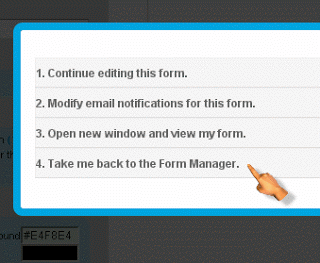
4. Click take “Take Me Back To Form Manager”
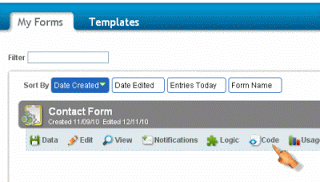
5. Click “Code”
6. Select “HTML with Javascript/CSS” from the tabs on the left
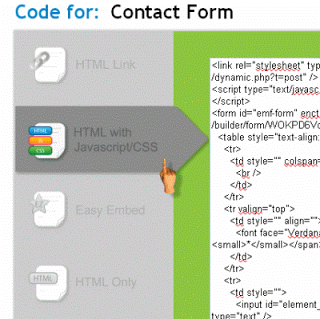
7. Copy the code
8. Create a new page on your blog then paste the code unaltered.
9. You should add a link to the page in your blog header menu.
Final Thoughts
I hope you are able to apply this trick in your blog. If you’ve any problem on adding this contact form just let me know. I will try to assist you on right way. Please share this article with your social friends!
