
So many beginners don’t know how to add blogger to Google search console and perfectly submit the blog sitemap.
Best Blogging Tools 2026
Starting a blog? The table below provides a quick overview of the best blogging tools to boost productivity, streamline your workflow, and drive more traffic in 2026.
| Tool | Use Of | Free Version | Pricing |
|---|---|---|---|
| Semrush | Keyword research, SEO analytics, and competitive insights for content growth | ✔ Yes | $165.17/mo |
| Jasper | AI-powered content generation and writing assistance | ✖ No | $59/mo |
| Grammarly | Grammar, spelling, and style checking for polished writing | ✔ Yes | $12/mo |
| Canva | Easy graphic design and visual content creation | ✔ Yes | $12.99/mo |
| Leadpages | Creating high-converting landing pages and lead generation funnels | ✖ No | $37/mo |
It’s really easy to do. I’m shortly explaining how to submit your blogger sitemap to Google search console (Google webmaster tools) with verifying your blog. If you intend to be listed in google search results, then you must tell google about every single page on your site. Submitting your sitemap to google goes a long way in SEO (Search Engine Optimization).
What is Google Search Console?
Google Search Console (previously Google Webmaster Tools) is a no-charge web service by Google for webmasters. It allows webmasters to check indexing status and optimize visibility of their websites. As of May 20, 2015, Google rebranded Google Webmaster Tools as Google Search Console.
Google Search Console Shows You:
- Search results in which your site appear
- How your site ranks in all search queries
- Click through rate (what percentage of people actually visited via that search result)
- All sites linking to your blog
- Keywords that drive visitors to your site
- Certain errors you might not be aware of.
Submit Blogger Sitemap to Google Search Console
After signing in to Google Seach Console with google account, you must add your blog and verify ownership. Follow these steps:
1. Adding your blog
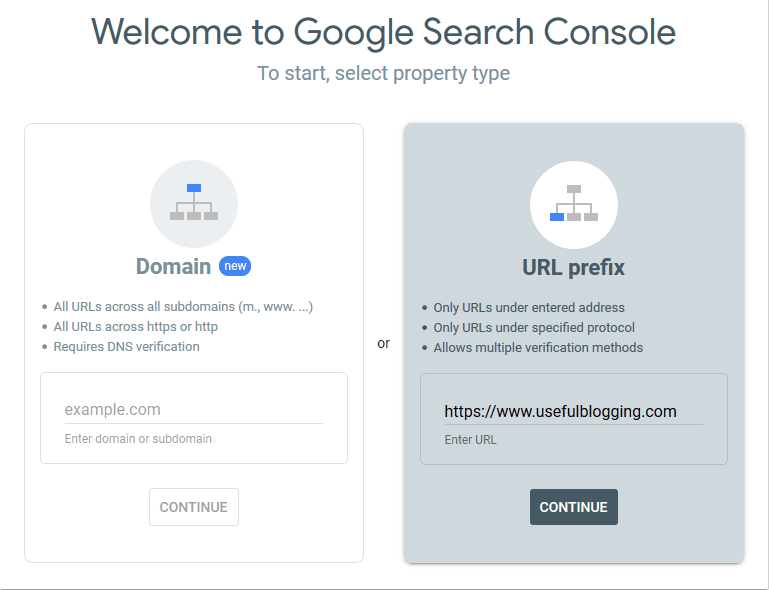
There are two different option to add your blog to Google search console. I will prefer “URL prefix”. Now, simple input your blog url and click on Continue.
2. Verify Ownership
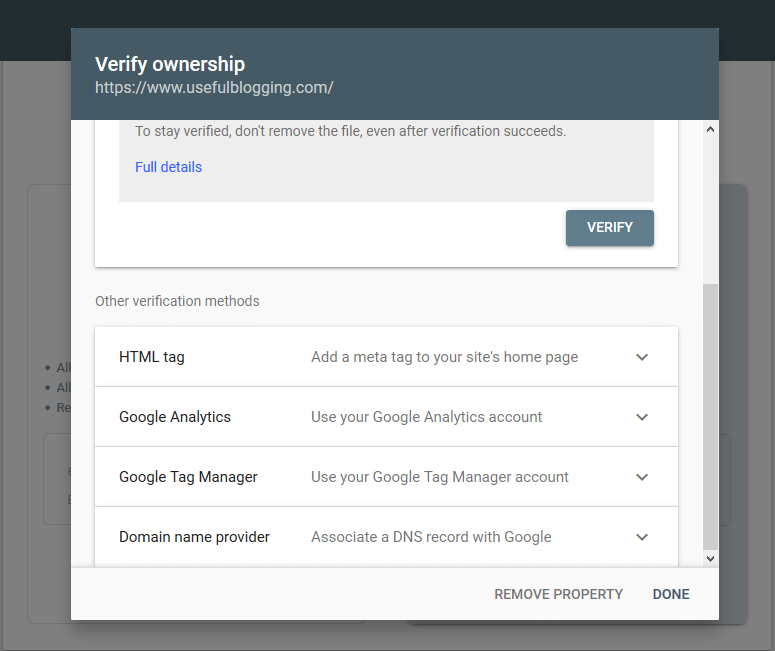
Google asking you to verify the domain ownership with a popup. Click on “HTML Tag” then copy the code given.
3. Add HTML Tag
You need to add copied HTML tag inside your blog. So, login to your Blogger Dashboard, click on Design, then Edit HTML.
Now, Search for this code: <head>
Paste the code you copied earlier right after <head> and save your template.
Just go back to your Google Search Console and click on Verify.
You’ve successfully verified your blogger blog to Google search console.
4. Submit the Sitemap
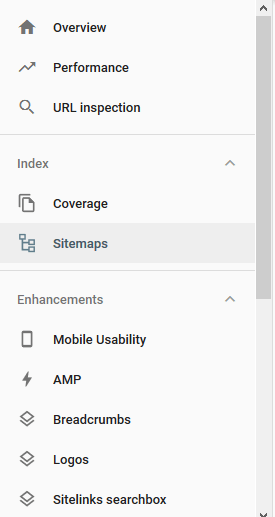
It’s time to submit the blogger sitemap to Google search console. Click on index from navigation links on the left sidebar and click sitemaps.
Now, paste the following part in the space provided after your blog’s address.
/atom.xml?redirect=false&:start-index=1&:max-results=500
Finally, you’ve done it! Google now has your sitemap for crawling and indexing.
Conclusion
Hope the article gave you the right way to index your blogger website to Google search console. If you’ve got any issue on adding blog, submitting sitemap or after submitted your blog sitemap just let me know. I will try to help you on it.

Superb blog thanks for sharing this useful information
You’re welcome!