
It’s a simple way to hide or remove comment author link in WordPress. Most of the WP users searching for this on Google but there’s no better way. You can follow this writing and simply install the plugin to remove comment author url in WordPress blog.
Must-Have WordPress Plugins 2026
Do you have a WordPress website? In the table below, we’ve listed 5 must-have WordPress plugins that are essential for any type of website.
| Plugin | Use Of | Free Version | Price |
|---|---|---|---|
| Rank Math | SEO optimization and on‑page ranking improvements for WordPress sites | ✔ Yes | $7.99/mo |
| Perfmatters | Speed and performance optimization by disabling unnecessary features | ✖ No | $29.95/year |
| UpdraftPlus | WordPress backup and restore management | ✔ Yes | $70/year |
| All-In-One Security (AIOS) | Comprehensive security hardening and malware protection | ✔ Yes | $70/year |
| Gravity Forms | Advanced, customizable form building and data collection | ✖ No | $59/year |
Do you want to hide or disable comment author link in WordPress? You know many WordPress blog webmaster wants to remove or auto disable commenter’s url which is add their blog visitor by using WordPress blog’s comment form Url fild. Though WordPress comments all the links are added by default auto No-follow. But webmaster are wants that any visitor cannot go out of their blog by clicking other one’s website link/url. Use Hide Comment Author Link plugin and easily disable comment author url from your WordPress site.
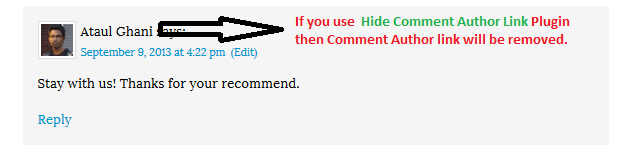
Hide Comment Author Link plugin removes all hyperlinks from comment author name. This plugin will strip all links from commenter names wherever they may appear throughout your site’s theme.
Just simply install Hide WordPress Comment Author Link plugin and it will be automatically disable your all comment author url.
Download Hide Comment Author Link from WordPress.org: Click Here to Get This Plugin

Final Words
I think your problem is fixed now. Still having issue with comment author link or other problem related with this plugin then ask me by commenting. I will try to assist you my best. Please share this plugin with others.

Hey Ataul!
I tried your plugin but it didn’t work on my blog.
Sincerely, Tad
@Ted,
Sorry to hear that it’s not working on your blog. We’ll try to make it working if you send us an email with blog url. So it will be easy to assist your over that email.
Thanks,
Ataul
This plugin information really useful thanks for providing these information keep sharing!!!!!
I love to install and test these things on my website so that I can avail all the benefits regarding these!!!!
@Granth, Thanks for your feedback!
I just found your plugin and it seems to be working great in WP 4.2.4.
But I have a question – is there any easy way to allow admin author links in comments?
Thanks either way – really appreciate your free plugin!
Shawn
Yes, There need to add another function then it will keep admin link visible. :)