
You might have noticed that some WordPress blogs shows a last updated date on the posts or pages.
If you’re looking to add the same feature in your blog too, this plugin will help you to achieve that. Use Posts Modified Date plugin and simply show post updated date before content in single post! You can gain loyalty and popularity by showing post updated date on your blog.
As a blogger I can suggest you to use this functionality on your blog. Audience will understand that you blog regularly updated.
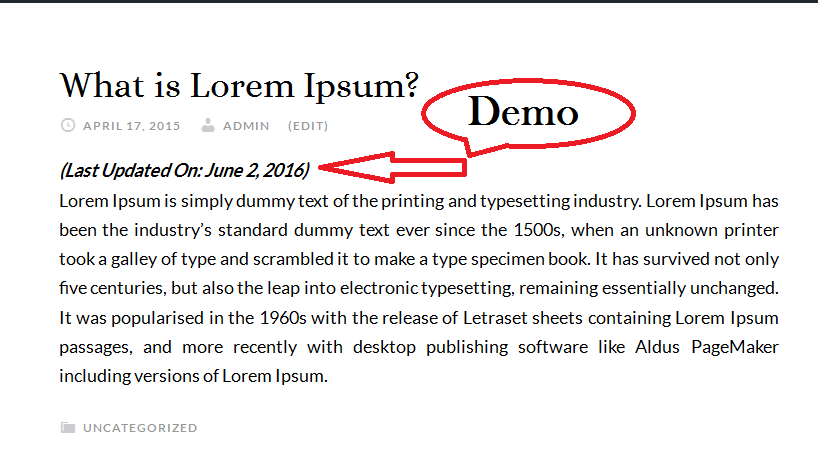
Show “Last Updated Date” in WordPress
Why most of the bloggers want to show last update date in blog post? Example, when you publish an article in your blog, there are often times you might need to make updates.
For example, if your article Posted on June 1, 2020, and you found out five days later that there was an update to the article. You can just edit the article, and it will show “(Last Updated On: June 5, 2020)” before content that article. Still there showing original published date in post info. So you’re going to show both dates published and updated to the readers. And this will help you to notice your readers that blog is always updated.
Why Need to Update Content?
- Content needs to be fresh. Old, outdated content is not very helpful.
- Topics central to any niche remain central to the discussion over long periods of time.
- To add updates and correct previously conceived notions about different aspects of any niche/industry.
- Previously created content is an asset, but it is a depreciating asset. It loses value over time.
- Content repurposing and updating as opposed to new content costs less in terms of time/money.
Just simply install Post Updated Date plugin and it will be automatically display Last Updated Date in your WordPress posts.
If you have any questions then ask by commenting bellow.

Thanks for this simple but helpful plugin.
I modified this plugin’s code to improve its I18n issue; please look at this article on the support forum if possible.
https://wordpress.org/support/topic/improve-i18n-issues-based-on-1-3/
Thanks for the modification. :)
Thanks for a great plug-in!
Is there a way to add another line below the last updated line to put blank line between the last updated line and the rest of the article?
Thank you!
I noticed that “Last Updated” appears even if the post was not updated. That’s annoying, especially for scheduled posts which are written before the publishing date. Is it possible not to show that line when publication date is later than last update?
Hello, is it possible to add “Last update” above the post content?
Thank you
@Dejan,
Yes, possible. But with current option you can do it. We need to customize code slightly for it. Please send us and email. We’ll guide you how you can do it.
Thanks!
Hi,
The “last updated on” is showing up in all my posts. I’m wondering how to get the “last updated on” to show up in my categories as well.
Thanks, Dianne
Hello Dianne,
In this case you need to send us an email. Our team will assist you to show it on categories as well.
Thanks!
Install POST MODIFIED DATE succeed. But the date displaying in Chinese.
How can I change the Cinese to English?
What is your website main language? Send us an email with your website link.
Thanks!
Hello, I want to translate “Last Updated On” in french ? Where I can do that ?
@Eric, Please send an email to our support. They will help to modify it. Thanks!
Hi, Thanks for your simple effective plugin. works fine on Posts. Is it possible you add this on Pages too?
Hi there. I like your plugin.
Is it possible to move the line to the bottom of the page rather it being on top?
Hey Muaad,
Yes, it’s possible to move at bottom. But need to customize few codes inside the plugin. Please send us an email using contact form.
Thanks!
Hi Ataul,
I would also like to know how to move the line to the bottom of the post.
Perhaps you have a updated version of the plugin I could install, where you changed the few lines of code for Muaad?
Thanks!
Hey Brittany,
You can replace $content = $awd_modified_date.$content; with $content = $content.$awd_modified_date;
That’s all you need to do to display the updated date to the bottom of the post. Thanks!
Why does it show the following before it?
…”/>
Can you please email us with a screenshot? Our team will help you to fix it.
I sent the screenshot. Please respond.
Hi how can I replace the publish date with the last updated date? Can you make that an option in the plugin?
@Shajan, Thanks for your comment! Actually all popular WordPress themes comes with the feature of displaying last updated date. And anyone can switch over updated date from publish date easily with theme options. That’s why we didn’t create option for it. But we always give the value of our users so hope the options will come out on next version.
Hey, where can I find your email address? we are having issues with the plugin appearing twice on a custom wordpress template.
Thanks
Lewis
You can send us email with this form: https://www.usefulblogging.com/contact
Thanks!
Hi. How do I change “Last updated on” to my local language (portuguese)? It’s “Última atualização” :)
You need to email our support team for editing the code! Hope you will get the better solution. :)
Love the plugin, but would like to have it for pages as well as posts. Is that possible?
Yes, possible! But you need to email us and pay for taking custom service.
Hello, I’ would like to change the text in Greek, can you help me ?
Great job btw ;)
Thank you
Yes, I can help you. Please email me with details (what changes you want to do). Thanks!
Thank you for the plugin.
It’s simple and really helpful.
I hope you can also create one that can change the post date to be updated post date.
Cheers,
Novangely @travellingangelstory
You’re welcome! I will create more option for it. :)
I love the plugin and like that it shows the last updated date, but I want to remove wherever it says “recently updated!” Can I do that?
Yes, you can edit that using editor. If not possible then please kindly email me. I will assist you. Thanks!
How about adding a feature to add a note to each edit? that way the user can be informed what was changed by the author.
It will not be good for privacy. Anything can be changed on updated why need to tell it to users? They will be able to know the post is updated that’s it. But i will keep it in mind for future update. If have no issue with Google then will add it.
hi Ataul, thanks for the plugin…
I was wondering if you could help me with changing the text to my native language ?
Which language you want to change? If need to change text then let me know.
Hey Ataul, great job man! I’m also trying to change the “Last Updated On” text to Spanish. I tried using Loko translate but seems that text is not available: http://prntscr.com/leeimv
Hey Billy, Can you send me an email using contact form. It will need to customize plugin code. Don’t worry! I will help you. Thanks!
Hi Ataul,
I’ve just installed your WP plugin, but only posts indicate the updated date. What about pages? You see, I am getting an error message in my Google Webmaster Tools about this issue, for all my posts AND pages. Thanks.
Sorry to hear about this issue. Can you please inbox me with your website url and details?
I installed the Last Updated Date in my WordPress 4.7.3 blog. Instead of displaying it in the main column, I wish to display it in the right-hand column. How do I do that?
Hey Peter, You need to customize it to change style. Can you explain me better what you exactly looking for?
Thanks!
I like the plugin functionality. And it seems to work well with my WordPress 4.7.3 using Weaver themes. However, the font is too large and strong compared with other information at the top of the post. Can you please advise how I can control the font? I would like to un-bold it and make it a few points smaller. Many thanks!
Sorry, I think I have solved my issue by modifying one line in the .php file for the plugin. Sorry to bother you, and thank you anyway! If the plugin continues to work for me I will post a good review for you.
Hey Art,
I’m really happy to know that you fixed the issue. Hope you will love it. You can always let me know if anything need to know.
Thanks,
Ataul
Thanks, Ataul. May I suggest: you could add to the plugin’s readme.txt a few instructions for adjusting the formatting or the text, such as: “The user can download the plugin’s PHP file, find the line that starts $wpt, adjust the HTML, and upload the revision.” Or, you could give the user a Settings page in WordPress dashboard where they can make the change. BTW it would be nice if your plugin updates don’t wipe out the user’s work so he has to do it again! Best wishes – Art Chester
Thanks for your kind suggestions. I will give few more time to set up a setting page. Hope you will share my site link with others!
Any way to have only certain posts show the last updated dated?
No, It’s for global posts!
I’m migrating some posts from one blog to a new one. Because we’re not doing a full export/import, I’ll have to manually migrate the media. This means that we’ll have to re-set the featured image on each post. However, this is going to cause your plugin to mark them all as “last updated on” whatever date we added the Featured image. Is there some way we can avoid that? For all the posts where we only re-add the featured image, I’d like to not show “last updated.” Is there some workaround for this?
Hi, I would like to show the last updated date instead of the original date. Have it on 1 line.
Derek Price March 10, 2015 Writing & Journals No Comments
Hey Derek,
Here’s the tutorial for you https://www.usefulblogging.com/show-last-updated-date-in-genesis-powered-blog/. Hope it will work for you.
Hi Ataul,
Anyway to change where it’s positioned? I’d like to show the updated date right after the post date like this:
Post Date / Last Updated Date
This is how it’s displaying right now:
Post title
Post date
Featured image
Last updated date
Thanks for this useful and simple plugin!
Yes, It’s possible but need to work on your template files. If you want to do that then contact with me via email. Thank You!
Hi,
Why dont have translatable string in this php so we can generate a template or pot file and translate to other languages?
In a multisite, for example, we can not hard code the php file to every language so this plugin is useless.
how can we have “Last Updated on:” really translatable with mo and po files?
Thank you,
Anyway to create your own text – so that you can write in your own native language “Last updated on” – fx. in Danish like I need to (Translation: “Sidst opdateret den”)
Could just be a simple text box where if empty the default “Last updated on” is used and if anything written in the box it will use that in front of the date.
Thanks for your comment! You’re asking to give an option to change the title. You’ve to wait for next update to get it. If you need to change the title urgent then email us. We’ll help you to change it. :)