
Google Web Fonts is a largest free hosted web fonts directory in web, launched in 2010 by Google Inc. WordPress CMS also has some best Google Fonts plugins, some are premium WordPress Google Fonts Plugins and Some are free. With these plugins, we use use any Google Fonts on the fly without any problem. Enjoy the collection of the best WordPress Fonts and Typography Plugins.
Must-Have WordPress Plugins 2026
Do you have a WordPress website? In the table below, we’ve listed 5 must-have WordPress plugins that are essential for any type of website.
| Plugin | Use Of | Free Version | Price |
|---|---|---|---|
| Rank Math | SEO optimization and on‑page ranking improvements for WordPress sites | ✔ Yes | $7.99/mo |
| Perfmatters | Speed and performance optimization by disabling unnecessary features | ✖ No | $29.95/year |
| UpdraftPlus | WordPress backup and restore management | ✔ Yes | $70/year |
| All-In-One Security (AIOS) | Comprehensive security hardening and malware protection | ✔ Yes | $70/year |
| Gravity Forms | Advanced, customizable form building and data collection | ✖ No | $59/year |
This is the ultimate list of top Google fonts plugin for WordPress. All of these plugins are user-friendly and easy to use. Hope you guys will love it!
Best Typography WordPress Plugins:
Here’s the ultimate source of best Google fonts WordPress plugins. I think you should try one of these Google Fonts WordPress plugin from this given list. Let’s check more:
1. Taqyeem
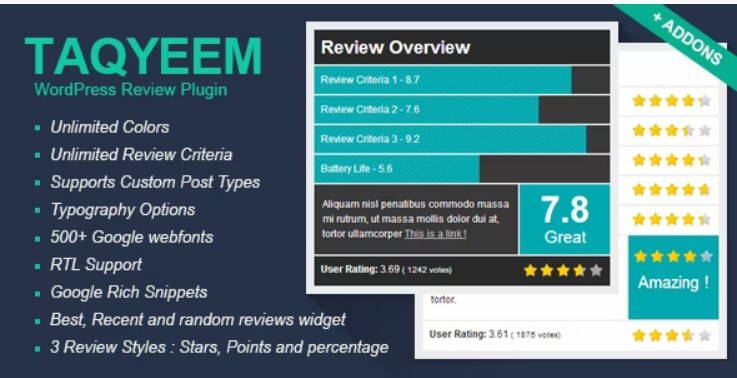
Taqyeem is a premium font and typography WordPress plugin. It is built for adding lovely ratings and reviews to your posts, pages, and custom post types. Use the customization options to create the perfect rating addition to your website. There are plenty of options to change the fonts, image, colors, style, and of course.
2. FontPress
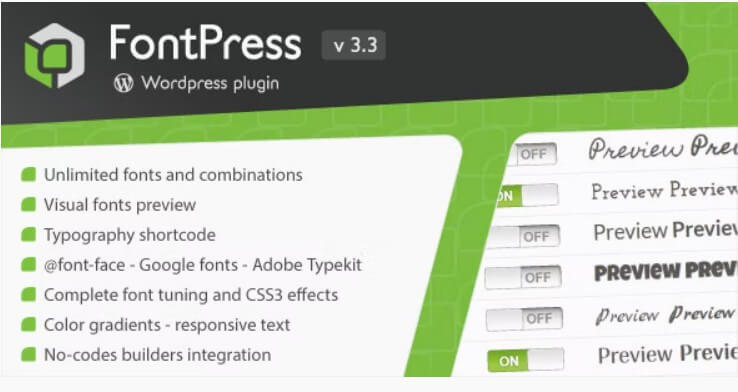
FontPress is a little, yet powerful, typography tool to easily empower websites, virtually managing any font. The plugin also supports new Google Early Access fonts for non-Latin languages. Add or just select the fonts you want to use. Create global rules and eventually concatenate them. It shows font previews in all their formats and allows preview of custom text in specific font sizes.
3. Easy Google Fonts
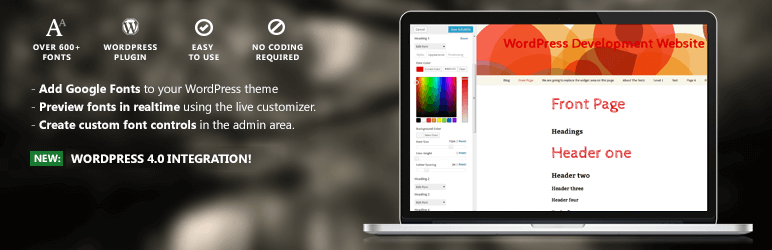
A simple and easy way to add custom google fonts to any WordPress theme without coding. This plugin integrates with the WordPress Customizer so you can preview google fonts on your site in realtime. It’s compatible with any theme.
4. WP Google Fonts
WP Google Fonts is a good addition in the best WordPress Google fonts plugins. It lets you add fonts from the Google fonts directory to your WordPress theme.
5. Fonts Plugin

Google Fonts is a popular free plugin that contains 1455 unique fonts. It allows you to easily use any of them on your WordPress website. It’s hard to know which font will look good on the website, that’s why it is included as a live preview feature. That means anyone can test each font and see a live preview of how it will look with their content instantly.
6. WP-Typography
WP-Typography is another free WordPress plugin that provides styling special characters like hyphenated words and fractions. It improves web typography and supports 70+ languages. It also automatically replaces characters with the appropriate alternatives, like trademark or registration symbols, ellipses, and pretty fractions.

Hi, absolutely got tons of value from your post. Please i have 2 quick questions.
1. What is the number of plugins every blogger shouldn’t exceed? I currently have about 18 installed, would you consider that number outrageous. Please could you also check out my site and offer me a
2. Your font is really beautiful. would you suggest plugins that would give me beautiful fonts just like yours?
Hey Naveen, First of all I would say to stop using more plugins. Because it will sow down your website. You can use https://wordpress.org/plugins/olympus-google-fonts/ plugin for great looking for collections. If you’ve any other questions or need any support then email us.
Thanks you!
I did use Easy Google Fonts for my once website. I didn’t use other plugins right now. I think other plugins are helpfull too.
@Vishal, Thanks for your comment!